I Used Cornell Notes for an Entire Semester — Here's My Honest Review
I committed to the Cornell system for every class, every lecture, for 16 weeks. Here's what worked, what was annoying, and whether my grades actually improved.
James T.
Senior, Computer Science
Note-Taking · EZ Grades
I'd heard about the Cornell Note-Taking System for years but never committed to it properly. Last semester, I decided to use it for every class, every lecture, for the entire 16-week semester. Here's my honest review.
The System (Quick Explanation)
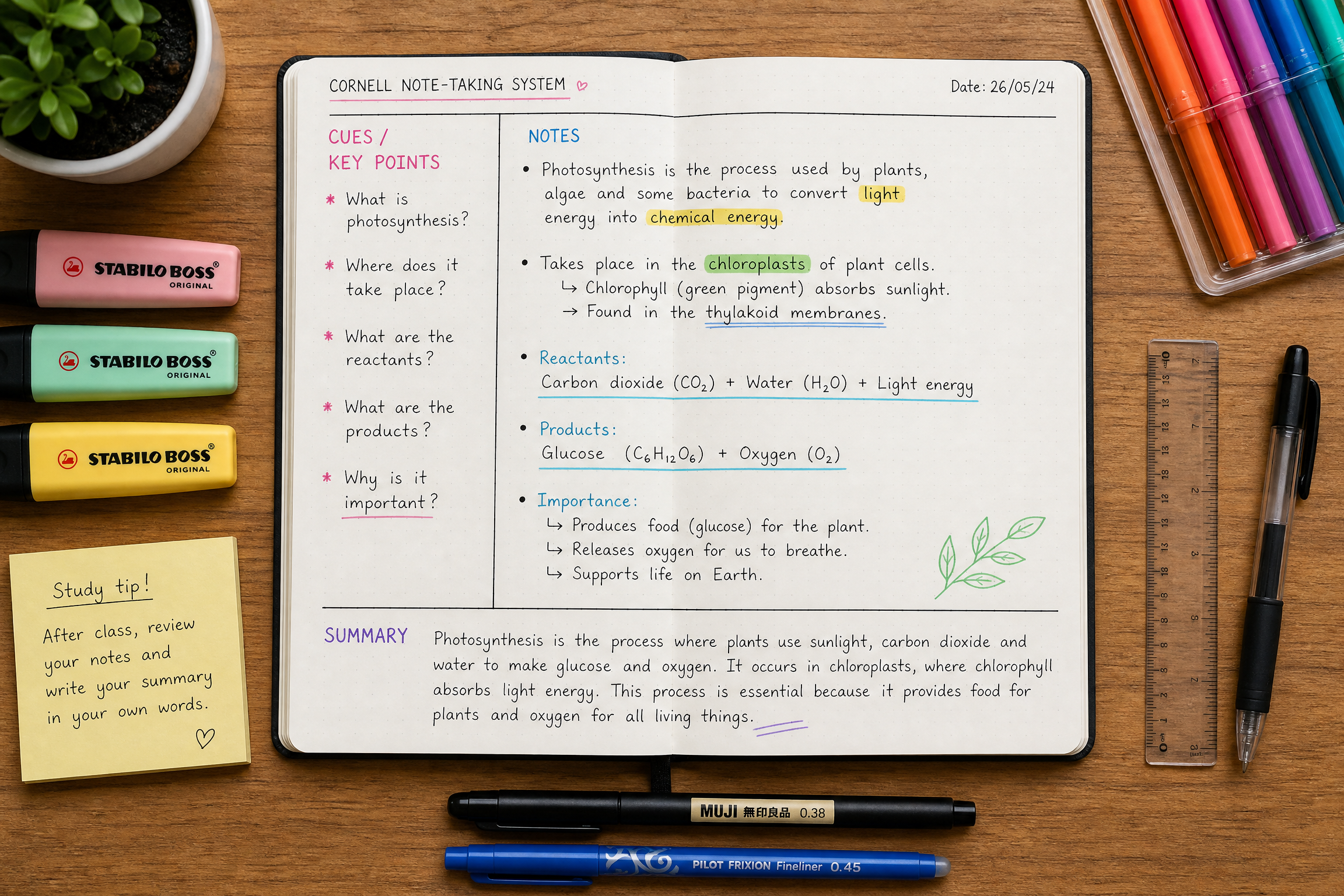
If you're not familiar: Cornell notes divide the page into three sections. The right column (about 70% of the page) is where you take notes during class. The left column (30%) is where you write questions and keywords after class. The bottom section is a 2–3 sentence summary of the page.
The idea is that the left column turns your notes into a self-testing tool — you cover the right side and try to answer the questions from memory.
Weeks 1–3: Annoying

The main annoyance: drawing the lines. I was spending 30 seconds at the start of every page drawing the Cornell layout, which added up over a semester. I fixed this by buying pre-printed Cornell note paper (you can find free printable templates online) and printing a stack at the start of the semester.
The other annoyance: filling in the left column after class. This step is crucial to the system but it requires sitting down after each lecture and doing the work. Some days I didn't do it, and those pages were much less useful for review.
Weeks 4–12: Finding the Rhythm
Once I got into the habit of filling in the left column the same day as the lecture, the system started to pay off. The questions I wrote in the left column became my study guide — I could cover the right side and quiz myself without making separate flashcards.
The summary section was more useful than I expected. Forcing myself to summarize each page in 2–3 sentences required me to identify the main point, which meant I was processing the material more deeply than if I'd just taken notes and moved on.
Exam Preparation

This is where Cornell notes really shone. Instead of re-reading pages of notes, I could fold the page so only the left column was visible and quiz myself on each question. This is basically active recall built into the note-taking system.
The Honest Verdict
Cornell notes are genuinely useful, but they require consistent follow-through on the post-class steps. If you take the notes but don't fill in the left column and summary, you've just drawn some lines on your page for no reason.
My grades: slightly better than the previous semester, but I also studied more consistently, so I can't attribute the improvement entirely to the note-taking system.
Would I recommend it? Yes, with the caveat that the system only works if you do the work after class, not just during it.
Cornell Notes for Different Subjects
The system adapts well to different subjects, but the implementation varies:
Sciences and math: The right column captures lecture content and worked examples. The left column has questions like "When do I use this formula?" and "What's the difference between X and Y?" The summary captures the main concept and its application.
History and social sciences: The right column captures events, causes, and arguments. The left column has questions like "What caused this?" and "How does this connect to what we studied last week?" The summary captures the main argument or significance.
Literature: The right column captures themes, quotes, and analysis. The left column has questions like "What does this quote mean?" and "How does this connect to the author's argument?" The summary captures the main interpretive claim.
The Post-Class Review Habit
The most important habit for Cornell notes is the post-class review. Here's how I do it:
- Within 24 hours of each lecture, I sit down with my notes
- I fill in the left column with questions and keywords
- I write the summary at the bottom of each page
- I cover the right column and try to answer each question from memory
- I mark anything I couldn't answer and review it again the next day
This takes about 15–20 minutes per lecture. It's the most valuable 15–20 minutes I spend on any subject.
Frequently Asked Questions
Q: Do I need special paper for Cornell notes?
No. You can draw the lines yourself, print free templates from Cornell's website, or buy pre-printed Cornell note paper. I use printed templates because drawing the lines every time got tedious.
Q: Can I use Cornell notes digitally?
Yes. Notion, OneNote, and Obsidian all support Cornell-style layouts. The key is that the left column/cue section must be usable for self-testing — you need to be able to cover the notes and see only the questions.
Q: How long should the summary section be?
Two to three sentences is ideal. The goal is to capture the main point of the page in your own words. If you need more than three sentences, the page probably covers too much material — consider splitting it.
Q: What if the professor talks too fast to use Cornell notes during class?
Take regular notes during class, then convert them to Cornell format afterward. The conversion process is itself a valuable review activity.
Related Articles

I Made Mind Maps for Every Chapter of My History Textbook — Here's What Happened

I Tried the Feynman Technique on My Hardest Subject — Here's My Honest Take
